How to Scrape Every Fortune 500 Job Listing
The Fortune 500 posts approximately 198,750 open roles across 500 different careers sites. There is no single API, no unified data feed, and every company runs a different Applicant Tracking System. This playbook shows how to route every one of them to the right NanoScrape scraper - ~98% coverage attempted (the remaining 11 companies need custom builds), realistic ~85-90% actually return jobs on the first run. Full careers-URL list (interactive HTML table + downloadable CSV), MCP prompts, mapper script, and honest cost math included.
In this tutorial
- F500 ATS distribution at a glance
- Why there is no single Fortune 500 jobs API
- F500 ATS coverage map
- The 3-actor stack (and one orchestrator)
- Tier 1: ATS-native scraping (57% of F500)
- Tier 2: LLM HTTP extraction (custom sites)
- Tier 3: LLM browser fallback (JS-only sites)
- Tier 4: Job Feed orchestrator (private beta)
- Unify output across tiers (mapper script)
- Run the pipeline from Claude or ChatGPT (MCP)
- The full Fortune 500 careers-URL list
- What it costs to sweep the F500
- Automate the whole pipeline with n8n
- Coming soon: JobFeed SaaS
Fortune 500 ATS distribution at a glance
By the NanoScrape team · Published 2026-09-01 · Updated 2026-10-15
Which Applicant Tracking Systems dominate the Fortune 500 today? Here's the full distribution across all 500 companies, color-coded by which NanoScrape scraper handles that ATS. Workday accounts for about 23% of the F500 careers pages.
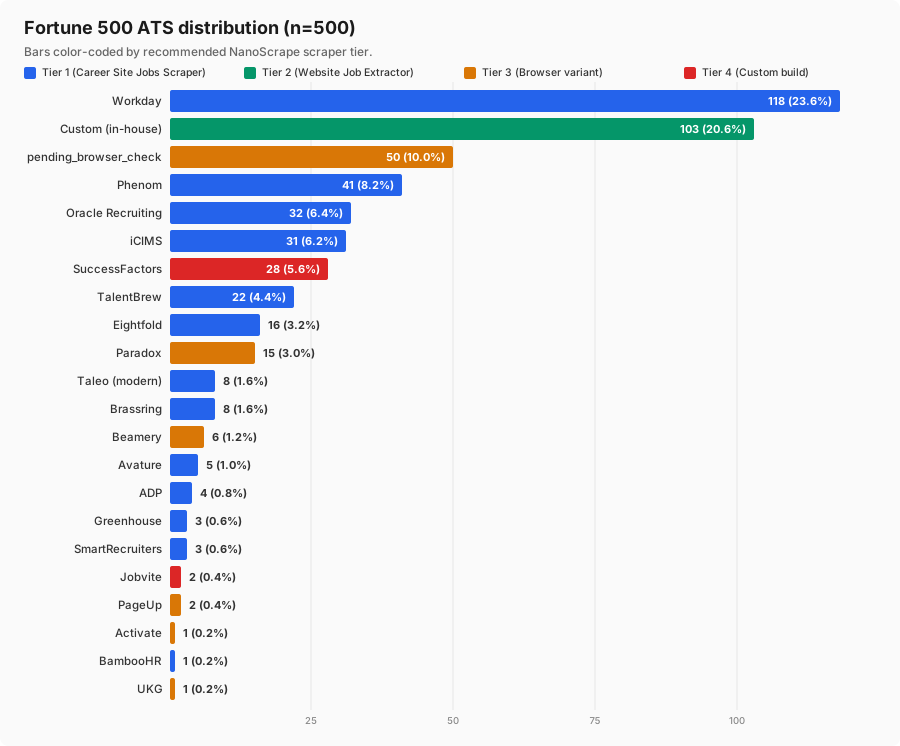
Want the raw data? The interactive Fortune 500 careers table lists all 500 companies with their detected ATS, careers URL, and a one-click Try + copy JSON button per row. Or grab the downloadable CSV (13 columns) for scripting.
Why there is no single Fortune 500 jobs API
Every Fortune 500 company posts jobs, but nobody publishes a unified feed. LinkedIn indexes a slice. Indeed indexes another. Google for Jobs surfaces a third. None of them cover 100% because the source of truth is always the company's own careers site - and every company runs a different Applicant Tracking System (ATS).
Analyzing 500 F500 careers pages shows five distinct problems any complete solution has to handle:
- ATS fragmentation. 24 different ATS platforms across the F500. Workday alone runs 118 of them. Custom-built portals run 103.
- Server-rendered vs JavaScript-rendered. About 20% of F500 careers pages (101 companies) load jobs via JavaScript only, so HTTP scraping returns an empty shell.
- WAF and anti-bot. 11 named deployments (SuccessFactors, Taleo classic, some Avature and Jobvite) block TLS-fingerprinted HTTP requests.
- Schema drift. Every ATS uses different field names for title, location, department, remote status, salary. Merging into one usable dataset takes real work.
- Frequency. Jobs open and close daily. A one-time snapshot is stale within a week.
The three-actor stack in this tutorial handles all five. Tier 1 talks to each ATS's public API directly. Tier 2 uses an LLM to extract jobs from the custom sites where no ATS API exists. Tier 3 spins up a headless browser only where JavaScript rendering forces it. The orchestrator ties them together and merges output into a single deduplicated feed.
F500 ATS coverage map
We audited all 500 Fortune 500 careers pages in May 2026. Here's the breakdown by ATS platform:
ATS PLATFORM               F500  SHARE
----------------------------------------------
workday                     118   23.6%
custom                      103   20.6%
pending_browser_check        50   10.0%
phenom                       41    8.2%
oracle_recruiting            32    6.4%
icims                        31    6.2%
successfactors               28    5.6%
talentbrew                   22    4.4%
eightfold                    16    3.2%
paradox                      15    3.0%
taleo                         8    1.6%
brassring                     8    1.6%
beamery                       6    1.2%
avature                       5    1.0%
adp                           4    0.8%
greenhouse                    3    0.6%
smartrecruiters               3    0.6%
jobvite                       2    0.4%
pageup                        2    0.4%
activate                      1    0.2%
bamboohr                      1    0.2%
ukg                           1    0.2%
----------------------------------------------
TOTAL                       500  100.0%

Tier 1 - Career Site Jobs Scraper (ATS-native): 285 companies (57.0%)
Tier 2 - Website Job Extractor (HTTP + LLM):    103 companies (20.6%)
Tier 3 - Website Job Extractor Browser:         101 companies (20.2%)
Tier 4 - Custom build (WAF-hardened):            11 companies (2.2%)

Every F500 company gets a recommended scraper - 100% coverage attempted,
~85-90% expected to actually return jobs on the first run.Coverage by industry
If you only care about specific verticals, here's how the F500 breaks down by industry sector:
- Retail & Consumer Goods: 75 companies (Walmart, Costco, Target, Kroger, Home Depot, McDonald's)
- Technology: 60 companies (Apple, Microsoft, Alphabet, Meta, Nvidia, Oracle, Salesforce)
- Manufacturing & Industrial: 58 companies (GE, Boeing, Caterpillar, 3M, Emerson)
- Banking & Financial Services: 53 companies (JPMorgan Chase, Bank of America, Wells Fargo, Goldman Sachs)
- Energy & Utilities: 49 companies (Exxon Mobil, Chevron, Marathon Petroleum, Valero)
- Healthcare & Pharma: 45 companies (Johnson & Johnson, UnitedHealth, CVS Health, Pfizer, Merck)
- Insurance: 42 companies (Berkshire Hathaway, MetLife, Prudential, Allstate)
- Telecom & Media: 17 companies (Verizon, AT&T, Comcast, Disney)
- Transportation & Logistics: 17 companies (UPS, FedEx, Delta, American Airlines)
The 3-actor stack (and one orchestrator)
Here's the whole pipeline at a glance. Each tier writes to its own dataset with its own field names; a small mapper script (or the Job Feed orchestrator) unifies them into a single schema.
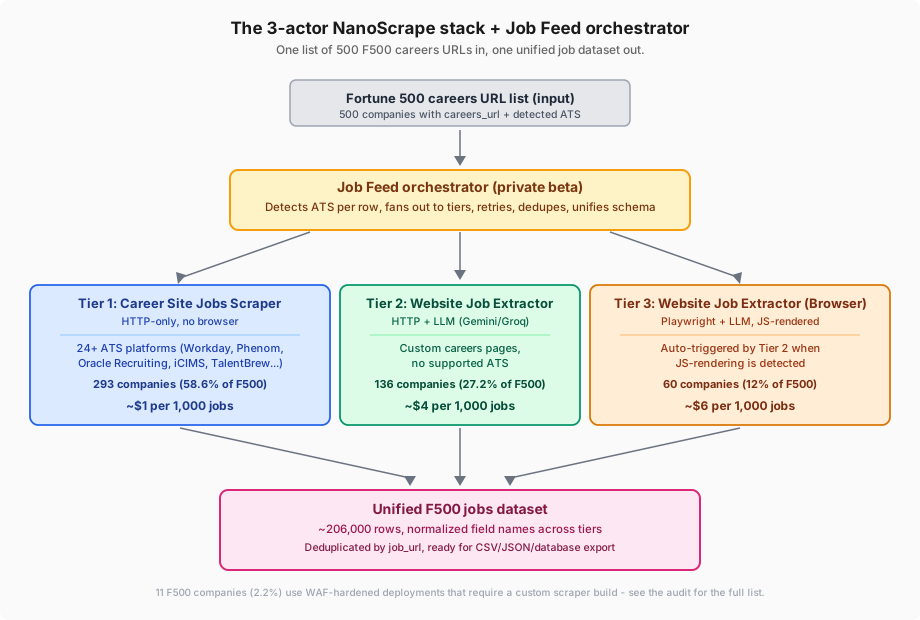
ats_system and ats_url whenever they detect a supported ATS on the way in. Feed those URLs into Tier 1 on the next run and you replace ~$0.014/company of LLM work with ~$0.001/company of ATS-native fetching. (2) Turn on enablePlaywrightFallback: true on the HTTP LLM extractor and it automatically re-runs any JS-flagged company through the Browser variant, so you only pay browser prices where you actually need them.company, ats_platform, apply_url. Website Job Extractor returns company_id, company_name, ats_system, application_url. The core fields (title, location, description, job_url) match, but a handful of names differ. See the mapper script section for a 40-line normalizer, or use Job Feed (private beta) to skip the mapping altogether.You can run the whole thing tier by tier as a manual playbook (skip to Tier 1), or hand the F500 list to the orchestrator and let it run every night on autopilot (skip to Tier 4).
Tier 1: ATS-native scraping (covers 57% of the F500)
The NanoScrape Career Site Jobs Scraper talks to 40 ATS platforms directly through their public JSON APIs. It's fast (HTTP-only, no browser), cheap ($1 per 1,000 jobs), and returns structured data with consistent field names within this actor.
Sample input: 8 F500 companies across 8 ATS platforms
{
  "queries": [
    "https://nvidia.wd5.myworkdayjobs.com/NVIDIAExternalCareerSite",
    {
      "platform": "phenom",
      "company": "https://jobs.cvshealth.com"
    },
    {
      "platform": "oracle_recruiting",
      "company": "https://iawmqy.fa.ocs.oraclecloud.com/hcmUI/CandidateExperience/en/sites/careers"
    },
    "https://careers-costco.icims.com/jobs/search",
    {
      "platform": "talentbrew",
      "company": "https://careers.walgreens.com/en"
    },
    {
      "platform": "eightfold",
      "company": "https://careers.nyl.eightfold.ai/careers"
    },
    {
      "platform": "brassring",
      "company": "https://sjobs.brassring.com/TGnewUI/Search/Home/Home?partnerid=25526&siteid=5032"
    },
    "https://ally.avature.net/careers/SearchJobs/"
  ],
  "maxJobsPerCompany": 500,
  "includeDescription": true
}
What you get back
{
  "id": "JR2019514",
  "title": "AI Engineering Platform Development Engineer",
  "company": "nvidia",
  "ats_platform": "workday",
  "location": "Israel, Yokneam",
  "department": null,
  "employment_type": null,
  "remote": false,
  "description": null,
  "apply_url": "https://nvidia.wd5.myworkdayjobs.com/NVIDIAExternalCareerSite/job/Israel-Yokneam/AI-Engineering-Platform-Development-Engineer_JR2019514/apply",
  "job_url": "https://nvidia.wd5.myworkdayjobs.com/NVIDIAExternalCareerSite/job/Israel-Yokneam/AI-Engineering-Platform-Development-Engineer_JR2019514",
  "created_at": "Posted Today",
  "updated_at": null,
  "scraped_at": "2026-09-01T13:20:20Z"
}company is the lowercase URL slug (not the full display name); created_at for Workday is a human-readable string like "Posted Today" or "Posted 5 Days Ago" (not ISO); description is null when includeDescription: false. Real charge was $0.006 for 5 job results + $0.001 start.maxJobsPerCompany to cap the cost of a first test run.F500 companies you can scrape today with this actor
- Workday (118): NVIDIA, Centene, Verizon, Marathon Petroleum, Target, Bank of America, Johnson & Johnson, Allstate, Salesforce, Truist, PNC, Fifth Third Bancorp, and 106 more.
- Phenom (41): CVS Health, Cencora, Humana, Freddie Mac, Procter & Gamble, HCA Healthcare, McDonald's, PepsiCo, and 33 more.
- Oracle Recruiting (32): JPMorgan Chase, Kroger, Dell Technologies, Albertsons, American Express, and 27 more.
- iCIMS (31): State Farm, Dollar General, Northwestern Mutual, Discover, and 27 more.
- TalentBrew (22): McKesson, Ford Motor, Chevron, Coca-Cola, PepsiCo bottling, and 17 more.
- Eightfold, Brassring, ADP, Avature, Taleo (modern), Greenhouse, SmartRecruiters (41 combined): covered end-to-end by the same actor.
Tier 2: LLM HTTP extraction (custom career sites)
About 103 F500 companies (Amazon, Walmart, Apple, Alphabet, Berkshire Hathaway, Exxon Mobil, Microsoft, Cardinal Health, and 95 more) don't use any commercial ATS. Their careers pages are hand-built with custom URL patterns, one-off HTML structures, and no JSON API. There is no way to write a stable HTML parser for every one of them - but an LLM can read any careers page and extract structured jobs on the fly.
That's what the NanoScrape Website Job Extractor does. Feed it a website URL - it auto-discovers the careers page, gates on job-related keywords to avoid wasting LLM calls, sends the cleaned HTML to Gemini (or Groq or OpenRouter), and returns validated job records with confidence scores.
Sample input: 8 F500 companies with custom careers pages
{
  "companies": [
    {
      "company_id": "amzn",
      "company_name": "Amazon",
      "website_url": "https://www.amazon.jobs/en/"
    },
    {
      "company_id": "wmt",
      "company_name": "Walmart",
      "website_url": "https://careers.walmart.com/us/en/home"
    },
    {
      "company_id": "aapl",
      "company_name": "Apple",
      "website_url": "https://www.apple.com/careers/us/"
    },
    {
      "company_id": "goog",
      "company_name": "Alphabet",
      "website_url": "https://careers.google.com/"
    },
    {
      "company_id": "brk",
      "company_name": "Berkshire Hathaway",
      "website_url": "https://www.berkshirehathaway.com/careers.html"
    },
    {
      "company_id": "xom",
      "company_name": "Exxon Mobil",
      "website_url": "https://corporate.exxonmobil.com/careers"
    },
    {
      "company_id": "msft",
      "company_name": "Microsoft",
      "website_url": "https://careers.microsoft.com/"
    },
    {
      "company_id": "cah",
      "company_name": "Cardinal Health",
      "website_url": "https://www.cardinalhealth.com/en/about-us/careers.html"
    }
  ],
  "llmProvider": "gemini",
  "geminiApiKey": "YOUR_GEMINI_KEY",
  "maxPagesPerCompany": 5,
  "enablePlaywrightFallback": true,
  "skipAtsExtraction": true
}enablePlaywrightFallback: true triggers the Browser variant automatically for any company whose HTML is JS-rendered - you avoid paying browser prices for the ~90% of sites that don't need it. skipAtsExtraction: true tells the LLM extractor: if you detect a supported ATS on the page, don't spend LLM tokens - just emit ats_system and ats_url so the caller can route that company to Tier 1 (Career Site Jobs Scraper, $1/1000) on the next run. Both switches are free to enable.What you get back
// EXAMPLE A - Job row (custom career page, LLM extracted)
{
  "company_id": "amzn",
  "company_name": "Amazon",
  "title": "Senior Software Development Engineer",
  "description": "Amazon Web Services is seeking a Senior SDE...",
  "location": "Seattle, WA",
  "employment_type": "Full-time",
  "experience_level": "Senior",
  "department": "AWS",
  "requirements": [
    "7+ years experience",
    "AWS",
    "distributed systems"
  ],
  "benefits": [
    "Health",
    "401k",
    "Stock"
  ],
  "source_url": "https://www.amazon.jobs/en/",
  "job_url": "https://www.amazon.jobs/en/jobs/2809341/senior-sde",
  "application_url": "https://www.amazon.jobs/en/jobs/2809341/apply",
  "workplace_type": "hybrid",
  "confidence": 0.94,
  "ats_system": null,
  "ats_url": null,
  "career_page_url": "https://www.amazon.jobs/en/",
  "extracted_at": "2026-09-01T06:30:00Z"
}

// EXAMPLE B - Sentinel row (JS-rendered page - triggers Tier 3 fallback)
{
  "company_id": "amzn",
  "company_name": "Amazon",
  "title": null,
  "source_url": "https://www.amazon.jobs/en/business_categories",
  "js_rendering_suspected": true,
  "js_indicators": [
    "react_markers"
  ],
  "extracted_at": "2026-09-01T13:20:31.194Z"
}skipAtsExtraction: true and enablePlaywrightFallback: false for a cost-bounded first pass), Amazon.jobs and Walmart careers both returned Example B (sentinels) with js_rendering_suspected: true - both sites turned out to be JS-rendered. This is exactly the moment enablePlaywrightFallback: true is designed for: it would auto-route those two companies to Tier 3 in one seamless run.company_id/company_name (not company), ats_system (not ats_platform), application_url (not apply_url). Use the mapper script below to normalize.Tier 3: LLM browser fallback (JS-only sites)
Roughly 20% of F500 careers pages (101 companies) render jobs with JavaScript only - the initial HTML is an empty React or Vue shell. HTTP scraping returns zero jobs, but the page loads fine in a browser.
The HTTP extractor detects this automatically. If it sees a nearly-empty <div id="root"> or a noscript warning, it emits a sentinel row (js_rendering_suspected: true) instead of an empty result. With enablePlaywrightFallback: true (see Tier 2 input above), the HTTP actor spawns a Website Job Extractor (Browser) run for those flagged companies. You get complete data with zero manual intervention and the browser run ID is stored in the key-value store as BROWSER_FALLBACK_RUN_ID.
Why keep them separate at all?
- HTTP actor: ~128 MB memory, ~$0.014 per company. Runs on 77% of the F500 (Tier 1 + Tier 2 combined).
- Browser actor: ~1-4 GB memory, ~$0.03 per company. Runs on the ~20% that need it.
- Two-stage economics: paying browser costs on all 500 companies would inflate the total sweep by ~2-3x. Auto-fallback keeps cost proportional to actual JS-rendering frequency.
Verified with a live smoke run
We ran the Browser variant against Meta careers (https://www.metacareers.com/jobs) on 2026-09-01. Meta turned out to run on Workday, so the extractor's LLM-to-ATS handoff kicked in and returned:
{
  "company_id": "meta",
  "company_name": "Meta",
  "title": "[ATS detected: workday] - use Career Site Jobs Scraper",
  "source_url": "https://www.metacareers.com/jobs",
  "application_url": "https://www.metacareers.com/jobs",
  "ats_system": "workday",
  "extracted_at": "2026-09-01T13:20:59.329Z"
}
In production, the correct follow-up is to send source_url (or ideally the underlying Workday tenant URL if you have it) to Tier 1 - which will return structured jobs at ~$0.001 each instead of paying browser + LLM prices on every re-run. Real charge for this one-company run was $0.003.
Tier 4: Job Feed orchestrator (private beta)
Running the three extractors by hand for a one-shot F500 sweep is straightforward. Running them regularly, tracking which companies changed platforms, handling failures with backoff, and merging into a single evergreen dataset with a unified schema - that becomes an ongoing operations job.
The NanoScrape Job Feed actor is the orchestrator that handles all of that. You give it a list of company URLs (or the full F500 careers-URL CSV from this tutorial), and it:
- Detects each company's ATS platform automatically.
- Fans out per ATS: sends supported platforms to Career Site Jobs Scraper, unknown or custom sites to Website Job Extractor, JS-only sites to the Browser variant.
- Runs the three underlying actors in parallel with per-tier concurrency limits.
- Deduplicates across tiers on
job_url(some ATS platforms redirect to the same underlying job page). - Unifies the schema: maps
company_id/companyto a single field, alignsats_system/ats_platform, normalises date formats, parses salary to a numeric range where possible. - Emits one consolidated dataset per run.
Unify output across tiers (mapper script)
Career Site Jobs Scraper and Website Job Extractor emit compatible-but-not-identical fields. Until Job Feed goes public (or if you want to keep raw control of your pipeline), here's a ~50-line Python normalizer that flattens both into a single schema and dedupes by job_url preferring Tier 1 (ATS-native, no LLM interpretation) over Tier 2/3 when the same URL appears in both.
from typing import Any

def normalize_career_site_jobs(row: dict[str, Any]) -> dict[str, Any]:
    # Career Site Jobs Scraper (Tier 1) -> unified schema
    return {
        "title":            row.get("title"),
        "company":          row.get("company"),
        "location":         row.get("location"),
        "department":       row.get("department"),
        "employment_type":  row.get("employment_type"),
        "remote":           row.get("remote"),
        "description":      row.get("description"),
        "job_url":          row.get("job_url"),
        "apply_url":        row.get("apply_url"),
        "ats_platform":     row.get("ats_platform"),
        "posted_at":        row.get("created_at"),
        "updated_at":       row.get("updated_at"),
        "source_tier":      "ats",
        "scraped_at":       row.get("scraped_at"),
    }

def normalize_website_job_extractor(row: dict[str, Any]) -> dict[str, Any]:
    # Website Job Extractor (Tier 2/3) -> unified schema
    return {
        "title":            row.get("title"),
        "company":          row.get("company_name") or row.get("company_id"),
        "location":         row.get("location"),
        "department":       row.get("department"),
        "employment_type":  row.get("employment_type"),
        "remote":           row.get("workplace_type") == "remote",
        "description":      row.get("description"),
        "job_url":          row.get("job_url"),
        "apply_url":        row.get("application_url"),
        "ats_platform":     row.get("ats_system"),
        "posted_at":        row.get("posted_at"),
        "updated_at":       None,
        "source_tier":      "llm-http" if row.get("ats_system") is None else "llm-ats-detected",
        "scraped_at":       row.get("extracted_at"),
    }

def merge_all_tiers(tier1_rows, tier2_rows, tier3_rows):
    unified = []
    unified.extend(normalize_career_site_jobs(r)         for r in tier1_rows)
    unified.extend(normalize_website_job_extractor(r)    for r in tier2_rows)
    unified.extend(normalize_website_job_extractor(r)    for r in tier3_rows)
    # Dedupe on job_url (Tier 1 wins over LLM tiers when the same URL appears)
    seen: dict[str, dict] = {}
    for row in unified:
        key = row["job_url"]
        if not key:
            continue
        if key not in seen or (row["source_tier"] == "ats" and seen[key]["source_tier"] != "ats"):
            seen[key] = row
    return list(seen.values())
Unified output schema
{
  "title": "Senior Compiler Engineer",
  "company": "NVIDIA",
  "location": "Santa Clara, CA",
  "department": null,
  "employment_type": "Full-time",
  "remote": false,
  "description": "<div>NVIDIA is looking for...</div>",
  "job_url": "https://nvidia.wd5.myworkdayjobs.com/.../job/Santa-Clara-CA/Senior-Compiler-Engineer_R0031234",
  "apply_url": "https://nvidia.wd5.myworkdayjobs.com/.../job/.../apply",
  "ats_platform": "workday",
  "posted_at": "2026-08-19T09:00:00Z",
  "updated_at": "2026-08-28T14:12:00Z",
  "source_tier": "ats",
  "scraped_at": "2026-09-01T06:00:00Z"
}Run the pipeline from Claude or ChatGPT (MCP)
All three actors expose an Apify MCP server URL, so you can drive them from any MCP-compatible AI client - Claude Desktop, Claude.ai, Cursor, VS Code, LangChain, LlamaIndex, or custom agents - without writing any code.
MCP server URLs
Tier 1: https://mcp.apify.com?tools=santamaria-automations/career-site-jobs-scraper
Tier 2: https://mcp.apify.com?tools=santamaria-automations/website-job-extractor
Tier 3: https://mcp.apify.com?tools=santamaria-automations/website-job-extractor-browser

All three at once (recommended for the F500 pipeline):
https://mcp.apify.com?tools=santamaria-automations/career-site-jobs-scraper,santamaria-automations/website-job-extractor,santamaria-automations/website-job-extractor-browser
Example prompts
Once connected, ask the AI to run the pipeline for a specific slice of the F500:
- All Workday-based F500: "Use
career-site-jobs-scraperto pull open engineering roles from every Fortune 500 company that uses Workday. Return a table with title, company, location, and apply URL." - Custom-site F500 in Retail: "Use
website-job-extractorwithskipAtsExtraction: trueto scrape careers pages for Walmart, Costco, Target, Kroger, and Home Depot. Return job titles and locations grouped by company." - Cross-tier by industry: "Scrape all open Data Scientist roles across the Fortune 500 Banking & Financial Services sector. Use
career-site-jobs-scraperfor companies on Workday/Phenom/Oracle Recruiting/iCIMS, andwebsite-job-extractorfor custom career sites." - Cross-tier by geography: "Scrape all open Software Engineer roles from Fortune 500 tech companies (Apple, Microsoft, Nvidia, Salesforce, Oracle, Meta) filtered to California and Washington state."
- ATS discovery, then structured extract: "Use
website-job-extractorwithskipAtsExtraction: trueon the top 20 Fortune 500 Insurance companies. For any company whereats_urlis returned, follow up withcareer-site-jobs-scraperon that URL for cheaper structured extraction." - Change monitoring: "Run
career-site-jobs-scraperagainst these 30 Workday F500 URLs. Compare titles + apply URLs against yesterday's run and tell me which jobs are new and which have disappeared."
The full Fortune 500 careers-URL list
We compiled from public sources with a sample verified manually all 500 F500 careers URLs plus their detected ATS platforms. Three ways to consume the list, pick whichever matches your workflow:
- Browsable HTML table (all 500 rows) - sortable by rank, industry, ATS. Filter box for keyword search. Direct links to careers pages and ATS portals.
- Download the CSV (all 500 rows) - machine-readable, 13 columns including a
tier_recommendationfield so you can route rows to the right actor programmatically.
Every row includes
rank- Fortune 500 rank for the current yearcompany- official company namedomain- primary website domainindustry- one of 12 industry buckets for easy filteringrevenue_usd,employees- for sizing decisionscareers_url- the verified careers page entry pointats- detected ATS platform (workday, phenom, oracle_recruiting, icims, custom, etc.)ats_url- the ATS portal URL when different fromcareers_url(useful for direct Tier-1 input)tier_recommendation- boolean, true if Career Site Jobs Scraper handles this deployment nativelyconfidence- detection confidence (high, medium, low)
What it costs to sweep the F500
Assuming an average of ~500 open roles per Fortune 500 company (bigger for retailers, smaller for pure-play tech), a full sweep processes about 200,000 jobs.
TIER 1 - Career Site Jobs Scraper (285 companies x ~500 jobs avg)
  Actor start:      $0.001
  Job results:      142,500 x $0.001 = $142.50
  Subtotal:                          ~$142.50

TIER 2 - Website Job Extractor HTTP (103 companies x ~350 jobs avg)
  Actor start:      $0.00005
  Companies:        103 x $0.01     = $1.03
  Job results:      36,050 x $0.004  = $144.20
  LLM tokens:       Gemini free tier = $0.00
  Subtotal:                          ~$145.23

TIER 3 - Website Job Extractor Browser (101 companies x ~200 jobs avg)
  Actor start:      $0.0001
  Companies:        101 x $0.03      = $3.03
  Job results:      20,200 x $0.006  = $121.20
  Subtotal:                          ~$124.23

---------------------------------------------------------------
TOTAL PER FULL SWEEP:               ~$411.96
---------------------------------------------------------------Repeat runs
Right now the actors do not filter by postedAfter or updatedSince, so a repeat run re-processes every job. If you want a delta-only feed today, the practical approach is: run the sweep, persist the result to your DB, then diff against yesterday's snapshot in SQL. Native incremental support (only pay for newly opened/closed jobs) is on the Job Feed orchestrator roadmap and will be free during the private beta.
Free-tier arithmetic
Apify's free tier includes $5/month of platform credit. That's enough to run a Tier 1 sweep against your favourite 10 F500 companies (~5,000 jobs = $5.00) for free, or to test the LLM extractor against 100+ custom career pages. Google Gemini's free tier fully covers Tier 2 for anything short of a full weekly F500 sweep.
Automate the whole pipeline with n8n
Once the manual playbook works, wire it up in n8n so you get a fresh F500 jobs dataset in your database every morning.
- Schedule Trigger: daily at 06:00 UTC.
- Read CSV / Google Sheet node: pull the F500 careers-URL list from your storage of choice.
- Split by ATS: route rows with
supported_by_actor = trueto a Career Site Jobs Scraper Apify node, rows withprimary_ats = customto a Website Job Extractor node withenablePlaywrightFallback: true, and rows withprimary_ats = pending_browser_checkeither to the same HTTP node (auto-fallback will handle them) or directly to the Browser variant. - Wait for completion: all Apify nodes run in parallel. Use the Apify node's built-in "wait for run to finish" option.
- Merge datasets: concatenate the output datasets via the Apify Get Dataset Items node.
- Normalize: a Function node runs the mapper from the Unify output section on every row.
- Dedupe: a Function node with a
Mapkeyed onjob_urlcollapses duplicates (Tier 1 wins). - Persist: Postgres, Supabase, BigQuery, or Google Sheets node writes the day's dataset with an
as_ofdate column. - Diff: optional last node runs a SQL diff against yesterday's snapshot and posts "N new / M closed" to Slack.
Coming soon: JobFeed SaaS
Running this pipeline yourself, on your own Apify account, is the right answer if you want raw data control and you're comfortable operating scrapers. But most teams that need Fortune 500 hiring data don't want to operate scrapers - they want a REST endpoint that returns fresh, deduped, normalized job listings on demand.
That's what JobFeed SaaS will be. We're currently building it on top of the same three-actor stack described in this tutorial. It exposes:
- REST API:
GET /v1/jobs?company=nvidia&updated_since=2026-08-25 - Webhooks: subscribe to new / removed / updated jobs per company or per keyword.
- Freshness SLA: Fortune 500 and Global 2000 refreshed every 24h; long-tail on demand.
- Unified schema: same field names regardless of underlying ATS, salary parsed to a numeric range where available.
- ATS analytics: query hiring velocity by industry, seniority, geography, and remote status without running any scrapers yourself.
FAQ
Which Fortune 500 companies can I actually scrape with the free tier?
Apify's free tier gives you $5/month of credit. At $1 per 1,000 jobs on Career Site Jobs Scraper, that covers about 5,000 jobs - enough for roughly 10 F500 companies of average size, or 20-30 mid-sized ones. Google Gemini's free tier covers Tier 2 LLM extraction for another 30-70 companies per day. Combined, you can sample the F500 quite meaningfully at zero cost before deciding whether to upgrade.
Do the actors support incremental (postedAfter / updatedSince) scraping?
Not today. Both Career Site Jobs Scraper and Website Job Extractor perform a full re-fetch on every run. To build a delta feed, run the sweep, write the result to your database with an as_of column, then SQL-diff against yesterday. Native incremental (only pay for jobs that changed) is on the Job Feed orchestrator roadmap and will be free during the private beta.
How often do F500 careers pages change ATS platforms?
Roughly 10-15% of F500 companies migrate ATS platforms every year, usually as part of a broader HR technology rollout (SAP SuccessFactors -> Workday, iCIMS -> Phenom, custom -> SmartRecruiters, etc.). We rerun the ATS detection pass monthly on the CSV and version the results, so the primary_ats column stays current.
Can I extract salary data from F500 jobs?
Salary is only extracted when the underlying careers page publishes it. US pay transparency laws (California, Colorado, Washington, New York) mandate salary disclosure for postings targeted at those states, so roughly 40% of F500 US roles include salary ranges. Career Site Jobs Scraper returns salary in the raw description field (parsing left to you), while Website Job Extractor's LLM step extracts salary_range as a structured field when present.
Why do the extractors output different field names?
Because they were built at different times to solve slightly different problems - Career Site Jobs Scraper is a pure HTTP client that mirrors each ATS API's original field vocabulary, while Website Job Extractor is an LLM pipeline that emits its own opinionated schema for cross-site normalization. The mapper script in the 'Unify output across tiers' section reconciles them in ~50 lines of Python. Job Feed (private beta) does the same thing internally so users of the orchestrator never see the split.
What about companies I can't scrape (SuccessFactors, Paradox, Taleo classic)?
About 2.2% of the F500 (11 named companies) use hardened WAF deployments or conversational-AI portals (Paradox) that resist HTTP-only scraping. For most business use cases the pragmatic answer is to accept ~89% coverage and log the misses. If you specifically need one of those companies, we can quote a custom scraper build with residential proxies plus browser session management - contact us at [email protected] with the target.
Is this legal? What about the LinkedIn hiQ ruling?
The three actors only access data publicly visible on company careers sites - no login, no bypassed authentication, no scraping behind paywalls. US courts (Ninth Circuit in hiQ Labs v. LinkedIn) have held that scraping publicly available data is not a Computer Fraud and Abuse Act violation, though hiQ later lost the contract-law portion of the same case; the law here is unsettled and contract claims sit separately. Individual company terms of service may restrict automated access, so you are responsible for reviewing them for your own use case. Consult a lawyer for jurisdiction-specific compliance questions.
Do I have to use n8n? Can I automate this in Python or Node.js?
You can call the Apify API directly from any language. The Apify Python client and JavaScript client are both first-class. n8n is popular because it lets non-engineers build the whole pipeline visually and handles retries, error branching, and scheduling out of the box. For code-first teams, a 100-line Python script does the same thing.
Related resources
- Career Site Jobs Scraper actor page: Full input reference, supported ATS platforms, output schema, and API examples.
- Website Job Extractor actor page: LLM-powered HTTP extractor for custom careers pages. Auto-detects 19 ATS systems and falls back to browser rendering when needed.
- Website Job Extractor (Browser) actor page: Playwright-based variant for JavaScript-only careers pages.
- Browsable F500 careers-URL table (all 500 rows): Sortable + filterable HTML table with careers_url, detected ATS platform, and supported_by_actor flag for every F500 company.
- Scrape LinkedIn Job Listings Without a Login: Companion tutorial for the LinkedIn side of the coverage story.
- All NanoScrape tutorials: Step-by-step guides for every actor in the NanoScrape catalog.