How to Scrape Eventbrite Events and Conference Data
Pull event listings from any Eventbrite search: titles, dates, venues, ticket prices, organizer profiles and GPS coordinates, without a browser or an API key. The actor pages through Eventbrite search results and fetches each event's detail page for price and organizer data. About $0.003 per event on the free tier.
In this tutorial
What data you get
Each event result contains 26 fields. Here is a real record from a Germany-wide search (test run on 2026-10-14):
{
  "id": "1992513899711",
  "title": "Munich Quantum Software Forum 2026",
  "description": "Meet the “who’s who” in quantum computing software.",
  "start_date": "2026-10-14T09:00:00+02:00",
  "end_date": "2026-10-15T18:00:00+02:00",
  "timezone": "Europe/Berlin",
  "url": "https://www.eventbrite.com/e/munich-quantum-software-forum-2026-registration-1992513899711",
  "image_url": "https://img.evbuc.com/...",
  "is_free": false,
  "is_online": false,
  "price": "99.0 - 199.0",
  "currency": "EUR",
  "venue_name": "Backstage Kulturzentrum",
  "venue_address": "Reitknechtstraße 6, 80639 München",
  "venue_city": "München",
  "venue_country": "DE",
  "latitude": 48.14504849999999,
  "longitude": 11.521601,
  "organizer_name": "MQSC",
  "organizer_url": "https://www.eventbrite.com/o/mqsc-121493039500",
  "category": "Science & Technology",
  "tags": [
    "High Tech",
    "Conference",
    "Quantumcomputing",
    "quantumsoftware",
    "softwareforum",
    "mqsf"
  ],
  "attendee_count": null,
  "source_url": "https://www.eventbrite.com/d/germany/all-events/",
  "source_platform": "eventbrite.com",
  "scraped_at": "2026-10-14T10:50:36Z"
}
Available fields
id: unique Eventbrite event identifier.title: event display name.description: short event summary from Eventbrite (at most 140 characters in our 100-event test run, not the full text of the event page).start_date/end_date: ISO 8601 timestamps with timezone offset.timezone: IANA timezone string, for exampleEurope/Berlin.url: direct Eventbrite link to the event.image_url: event banner image URL.is_free: boolean, true when the event has no ticket price.is_online: boolean, true for virtual events.price: ticket price as a string, or a range such as99.0 - 199.0when an event has several ticket types.currency: ISO 4217 currency code.venue_name: name of the physical venue.venue_address: street address of the venue.venue_city/venue_country: city and country for filtering.latitude/longitude: GPS coordinates of the venue.organizer_name: name of the event organizer.organizer_url: Eventbrite organizer profile URL.category: Eventbrite category, for example Science & Technology or Music.tags: array of event tags set by the organizer.attendee_count: part of the output schema, but the actor does not fill it today (empty in every row we tested).source_url: the Eventbrite search page this event was found on.scraped_at: ISO 8601 timestamp of the scrape.
includeDetails: false to skip each event's detail page. You then get no price, currency, is_free or organizer_* fields, but the run is much faster. With details on, our 100-event test run took about 7 minutes.Prerequisites
- A free Apify account. Sign up at the actor page. The free tier includes $5 of credit every month -- enough for roughly 1,600 events.
- An Eventbrite search URL, or a location slug and optional category keyword. No Eventbrite account or API key is needed.
Open the actor
- Go to the Eventbrite Scraper on Apify.
- Click Try for free and sign in with Google or email. No credit card required.
- You land on the Input tab, ready to configure your search.
Set your search
There are two ways to define what to scrape. The simplest is to paste a search URL directly from Eventbrite.
Option 1: Paste a search URL
Copy a search page URL from Eventbrite and paste it into Search URLs. You can add multiple URLs and the actor splits the result budget evenly across them.
{
  "searchUrls": [
    "https://www.eventbrite.com/d/germany--berlin/tech/",
    "https://www.eventbrite.com/d/united-kingdom--london/conferences/"
  ],
  "maxResults": 100
}
Option 2: Search by keyword and location
Leave Search URLs empty and set a Search Query and Location instead. The actor builds the URL for you.
{
  "searchQuery": "tech",
  "location": "united-states--new-york",
  "maxResults": 50
}germany, france. Regions: united-states--new-york, germany--berlin. Cities: ca--san-francisco, united-kingdom--london. For online events: online.Key input parameters
- Search URLs: one or more Eventbrite search page URLs.
- Search Query: keyword or category slug such as
conferencesornetworking. - Location: Eventbrite location slug. Default:
germany. - Max Results: maximum events to return (1 to 5,000). Default: 100. The budget is shared evenly across all search URLs, with unused results rolling over to the next URL.
- Include Details: when true (the default), fetches each event's detail page for
price,currency, andorganizer_*fields. Set to false for faster runs when you only need basic listing data.
Run and watch the results
Click Start at the top right. Events appear in the Results tab as the actor pages through the search. Each search page holds up to 20 events (often fewer once promoted duplicates are removed), so a 100-event run reads 5 or more pages. With includeDetails: true, the actor also fetches each event's detail page for ticket price and organizer data.
Export your results
From the Results tab, click Export to download in JSON, CSV, Excel, or HTML. For automated pipelines, use the Apify API or connect to Google Sheets, Airtable, or a webhook via the Integrations panel.
# Download results as JSON via API
curl "https://api.apify.com/v2/datasets/{DATASET_ID}/items?format=json&token={YOUR_API_TOKEN}" \
--output events.jsonExample: tech events in London, 287 upcoming
A B2B sales team or an event sponsor wants to know where London's tech founders and engineers meet in the coming months. One run, one keyword, one city.
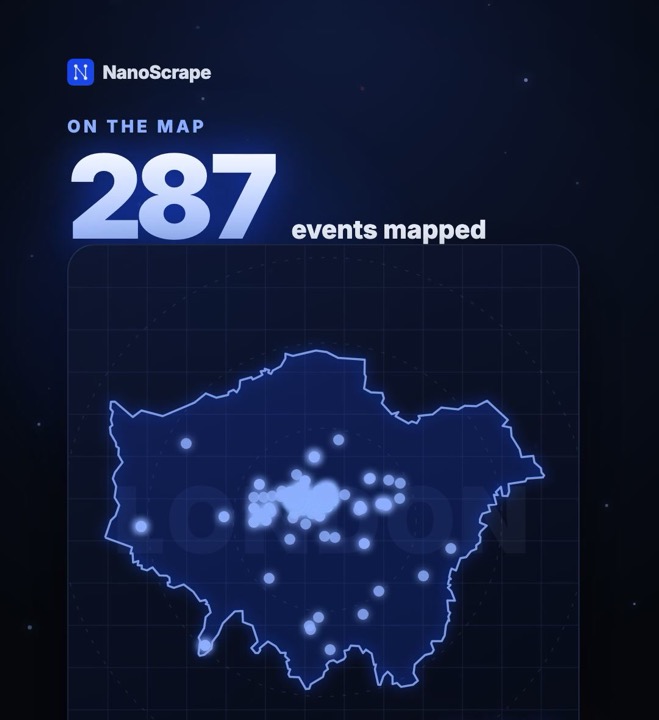
Search "tech", location united-kingdom--london, up to 300 events. Run on 21 October 2026.
- 300 events came back. 287 are kept: venue inside Greater London (by coordinates), start date 22 October 2026 or later, not cancelled.
- The 287 events run from 22 October 2026 to 19 July 2027 and come from 136 organizers.
- 88 are free to attend, and 157 take place within 30 days of the run.
- Cost estimate: 300 events × $0.003 + $0.001 for the run = about $0.90 on the free plan.
Input:
{
  "searchQuery": "tech",
  "location": "united-kingdom--london",
  "maxResults": 300,
  "includeDetails": true
}
Claude prompt:
Use the Apify MCP server. Run the actor santamaria-automations/eventbrite-scraper with searchQuery "tech", location "united-kingdom--london", maxResults 300 and includeDetails true.
Before you start the run, tell me what it will cost and wait for my OK.
When it's done, drop cancelled events and events that have already started. Tell me how many events are left, the date range, how many different organizers there are, how many events are free, and how many take place in the next 30 days. Then give me a table of the 10 venues with the most events.
Swap the keyword for ai, startup or networking, or the location for another city slug, and schedule the run weekly in Apify to catch new events as they are listed.
Pricing
The actor uses pay-per-result billing with no monthly fee and no minimum spend.
- Actor start: $0.001 per run (one-time flat fee regardless of batch size).
- Event result: $0.003 per event on the free tier.
- 100 events costs roughly $0.30 all-in.
- 1,000 events costs roughly $3.00 all-in.
The free Apify account includes $5 of credit every month, which covers roughly 1,600 event results at no charge. Paid plans get volume discounts -- the cost drops to $0.00287 per event on the Gold tier and above.
Common use cases
Event discovery and monitoring
Run the same search on a schedule to track what is happening in a city or category over time. The start_date, venue_city, and category fields let you filter and sort programmatically -- useful for building an internal events calendar or alerting system.
Conference and networking lead generation
Find events where your target audience gathers. Filter by category and venue_city, then use the organizer_name and organizer_url fields to reach out to conference organizers about sponsorships or speaking slots. The tags field gives you niche sub-topics beyond the main category.
Competitive event tracking
Monitor events in your industry to see when and where competitors or complementary products sponsor or exhibit. The category and tags fields narrow a broad search down to your niche, and organizer_name shows who runs each event.
Geo-mapping and market research
Events with a physical venue include latitude and longitude (every row in our 100-event test run had them). Feed these into a mapping tool to visualize event density by city, identify under-served markets, or find clusters of activity around a specific date range.
AI agent integration via MCP
Connect the actor directly to any MCP-compatible AI client -- Claude Desktop, Claude.ai, Cursor, or VS Code -- using the Apify MCP server URL:
https://mcp.apify.com?tools=santamaria-automations/eventbrite-scraperOnce connected, you can prompt your AI client to scrape Eventbrite directly. Clients that support dynamic tool discovery receive the full input schema automatically via add-actor.
Automate with n8n
To track upcoming events on a weekly schedule and push results to a spreadsheet or CRM, connect the actor to n8n using the Apify node.
- In n8n, add a Schedule trigger set to weekly.
- Add an Apify node, select Run Actor, and enter
santamaria-automations/eventbrite-scraperas the actor ID. - Set the input JSON with your search URL or location and category.
- Add a Google Sheets or Airtable node to append each week's results to a tracking spreadsheet.
- Optionally add a Filter node to pass only events where
is_freeis false andstart_dateis within the next 30 days, then send a summary to Slack or email.
FAQ
Do I need an Eventbrite account or API key?
No. The actor scrapes Eventbrite's public search and event pages without authentication. No account, no API key, and no session cookies are required.
How many events can I scrape at once?
Set maxResults to any number between 1 and 5,000. Eventbrite caps its own search results at about 1,000 events (49 pages) per search URL. For more, provide multiple search URLs for different cities or categories -- the actor splits the budget evenly across them.
Why are some price or organizer fields empty?
price, currency, is_free and the organizer_* fields come from each event's detail page, which the actor fetches only when includeDetails is true (the default). If you turned it off for speed, those fields are null. Even with details on, some events publish no price: in our 100-event test run, 9 had none.
Can I scrape online or virtual events?
Yes. Set location to online or include an Eventbrite search URL filtered to online events. The is_online field in the output confirms whether each event is virtual.
How do I get only free events?
The actor returns all events from your search URL regardless of price. After the run, filter the dataset by is_free: true. The actor keeps the query parameters of your search URL, so you can also set filters on Eventbrite in your browser first and paste the filtered URL into Search URLs.
What does the free Apify tier cover?
The free tier includes $5 of credit per month. At $0.003 per event, that covers roughly 1,600 events before any charges apply.
Does the actor work for all countries?
The actor works with any Eventbrite location slug, for example france, japan or australia--sydney. Our own test runs covered Germany and the United States.
Related resources
- Eventbrite Scraper actor page: Full specs, pricing tiers, and input schema documentation.
- Eventbrite Scraper on Apify: Actor changelog, usage statistics, and issue tracker.
- How to Extract Emails from Websites in Bulk: Enrich event organizer data with contact emails from their websites.
- How to Scrape Google Maps for Business Leads: Cross-reference event venue data with Google Maps to enrich addresses and add ratings.
- All NanoScrape tutorials: Step-by-step guides for every actor in the NanoScrape catalog.